
Before USB
There has been a lot of revisions to USB meaning (universal serial port). USB only came to because of there being a time where you had separate port for each and every thing you would have wanted to hook up to your computer. Like a Printer connection was its own special port called “Parallel Port”. if you wanted video VGA it was really common. If you need to hook up a mouse or keyboard you could only use the dedicated PS/2 Port and they had to be plugged in first before turning on the machine or they wouldn’t work again until you restarted your machine. FireWire was the best thing at the time for external drives of that nature, something better than just having to use serial port when that could only do around 1mbs of data transfer, that was the higher speed equivalent, achieving 12.5 to 50mbs for the first implementation called Firewire 400.
USB 1.0/ 1.1
This edition of USB is barely around in modern times but the most effective of use for this edition of USB is for Keyboards and Mice, that’s about it with it operating at “12 Mbit/s (1.5 MB/s)” for the signaling rate. The USB port infill Color for this is white.
USB 2.0
This edition of USB is very common and has been very prevalent in the past what feels like 10 years cause the Apple iPhone has used the USB 2.0 standard of data for over 9 years embedded in there lighting port proprietary cables. It can operate at 480 Mbit/s (60 MB/s) for the signaling rate. The USB port infill Color for this is Black.
USB 3.0 (AKA 3.2 Gen 1×1)
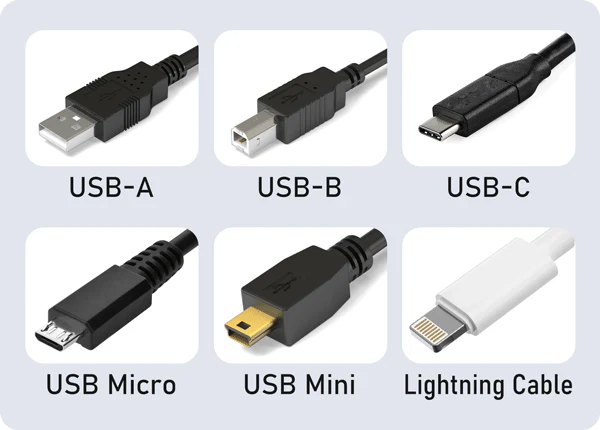
This is where it begins to get really exciting! In the bleeding edge of 2025 and beyond the USB standard begins to keep changing the names a little bit hairy to keep track of but I am going to use the current edition of what there called to knock out any kind of confusion before it starts. With 3.2 Gen 1×1 you get “5 Gbit/s (625 MB/s)” for the signaling rate. Anything labeled previously as (USB 3.0, 3.1 Gen 1, 3.2 Gen 1×1) is the same. It can be in the shape of USB-A (rectangle) or USB Type-C (oval). The USB port infill Color for this is Blue and for Type-C Port shapes they haven’t made the infill a different color only black.
- One very specific feature of when USB Type-C first launched with having the capability of doing with only Type-C to Type-C Cables is bidirectional communication. Which means that no matter how you connect your cable to your device you can switch which device or not that’s the host. So if you want to use Android device to charge an iPhone 15 or above that has Type-C port you could on the fly say I want to use 1 device to charge the other one. Then later switch that in the software to steal the power from another device to charge the other one on the fly, so that’s a major edition to what Type-C brings to the table and how it differs from Type-A.
USB 3.1 (AKA 3.2 Gen 2×1)
With 3.2 Gen 2×1 you get “10 Gbit/s (1.25 GB/s)” for the signaling rate. This is a Second generation of USB 5 Gbit/s which allows it to be twice as fast and is most commonly going to be in the shape of USB-A (rectangle) or USB Type-C (oval). The USB port infill Color for this is Red and for Type-C Port shapes they haven’t made the infill a different color only black still.
USB 3.2 (AKA 3.2 Gen 2×2)
Now this is where we take what we have learned with now being on Generation 2 port but where we are introduced to Lanes are doing for us. With 3.2 Gen 2×2 you get “20 Gbit/s (2.5 GB/s)” for the signaling rate. Lanes are basically extra dedicated pipes for data to move over, very similar to cars on a street. You go from having 1 path way to increasing the ability to have 2 lanes 1 for each direction, then going and doubling up on each side for a total for 4 lanes or paths on either side so that’s a very basic metaphor of whats going on here to essentially increase the bandwidth.
- Gen 2 x Lanes 2 = Gen 2×2
USB 4.0
Its the big four O. Which means that now where doing “20 Gbit/s” times 2 meaning where at the stage of being caught up to what Thunderbolt 4 can do equaling “40 Gbit/s (5 GB/s)” for the signaling rate. I mentioned Thunderbolt 4 now because USB & Thunderbolt share the same Type-C port housing. Thunderbolt is a big deal it has the capability to bring daisy chaining, charging devices with either (100Watt, 120Watt or even 240Watt), doing 4K & 8K video signaling. Thunderbolt is primarily an Intel & Apple collaborative effort so you would find 4x Thunderbolt 4 ports on a Macbook pro for an example. Most Windows PC’s commonly have at most 2x Thunderbolt 3 or 4 ports.
Which when it comes to Thunderbolt you have a dedicated data line for that achieving 40Gbit/s with Thunderbolt 3 & 4.
- Thunderbolt 3 (40Gbit/s) – Released in 2015
- Simultaneously drives two external 4K displays at 60 Hz, One 4K at 120 Hz (Macbook Pro 2016 exclusive 5K at 60 Hz)
- 100 Watts Charging Ability
- Thunderbolt 4 (40Gbit/s) – Released in 2020
- Thunderbolt Alternate Mode: this allows for you to natively transmit DisplayPort video signals along with data and power over a single cable.
- 120Watt Charging Ability – This is based on the Technology of USB PD for Power Delivery. Most of the time this still going to be 100Watt Charging but you’re having to use an external power supply with a USB-C Docking Station.
- Thunderbolt 5 (80Gbit/s – 120Gbit/s) – Released in 2023
- 240 Watts Charging Ability
Thunderbolt Quirks
- Anything Thunderbolt is going to be backwards compatible.
- Due to Signal Noise and Signal integrity Thunder bolt cables a commonly kept to a length of 0.5m – 1m this is going to be best if you want to reach 80Gbit/s to 120Gbit/s on let’s say Thunderbolt 5.
- If you want a 2 meter Cable that’s gonna require an Active Power type Chip to help boost the signal integrity.
- There are 60 Meter Thunderbolt cables an optical type of design where the shorter versions are based on copper.
- Thunderbolt 1 and 2 aren’t used for anything meaningful in modern times, they were primarily found on Apple devices but was in the shape of a Mini Display port connector. This port was made & designed so that once Type-C tooling was prevalent enough things like Thunderbolt 3 would be there ready to use they could start to lay the foundation of what was going to come in the future. Apple Used it on old iMac’s for Target display mode which used the Thunderbolt 2 interface but with it needing to be an adapter to be capable to be done. The old trash can 2013 Mac Pro had 6x Thunderbolt 2 connectors and if you wanted to use them in any capacity you had no option but to buy special adapters to make use of them.
- All Modern Apple Silicon Machines from M1 and all future M-Series Chips have there Thunderbolt Ports wired up in such away that each port has there own dedicated controller chip which is really nice for when you are dealing with having loads of different high bandwidth connections hooked up they don’t eat bandwidth from each other from whats hooked up. This is found to be an Apple exclusive benefit.
- On a Windows PC’s with 2x Thunderbolt Ports you are using 1 Bus or Controller. Manufacturers almost never advertise this clearly.
- On AMD Products from Laptops to Desktops you wont find Thunderbolt mentioned at all. Intel and Apple hold the rights to use it since 2011 since they created it. The closest thing AMD can hope to have and use and get to use is USB4 where there has been this Open Source type of movement since 2020 to try and level the playing field so that AMD laptops don’t feel like there bad machines if they can’t use Thunderbolt like technology at all.